Install on Rocky Linux or AlmaLinux
Install HF Panel on Rocky Linux or AlmaLinux 8, 9 or 10, CentOS Stream 9 or 10, or CloudLinux 8, 9 or 10 with SELinux kept on, and know what is different from Ubuntu and Debian.
HF Panel runs on Rocky Linux and AlmaLinux 8, 9 and 10, CentOS Stream 9 and 10, and CloudLinux 8, 9 and 10 as well
as on Ubuntu and Debian. The command and the panels are the same; underneath, the installer uses dnf, firewalld and
SELinux. This tutorial installs it on one of these systems and shows what to check afterwards. Allow 30 minutes.
You need:
- a freshly installed 64-bit Intel/AMD (
x86_64) server with at least 1 GB of memory and 5 GB of free disk, running Rocky Linux or AlmaLinux 8, 9 or 10, CentOS Stream 9 or 10, or CloudLinux 8, 9 or 10 (ARM is supported on Ubuntu and Debian only) - root access over SSH
- a domain for the server, for example
yourdomain.com, and a licence key or an email address for the 30-day trial
1. Check the system
cat /etc/os-release
getenforce
The first command shows the release. The second shows the SELinux mode: Enforcing is the normal state and is kept.
Permissive and Disabled work too; the installer never changes the mode and never runs setenforce 0.
Important: install on a clean server. Do not install on a server that already runs another control panel, websites or a mail server.
Note: Rocky Linux 8 and AlmaLinux 8 get security updates until May 2029. For a new server, 9 or 10 is the better choice; HF Panel supports 8 for servers that must stay on it.
2. Open the ports at your provider
If your provider has a cloud firewall or security group, open TCP 22, 80, 443, 8443, plus 21 and 40000–40100 (FTP), 25, 465, 587, 993, 995 (email) and 53 TCP and UDP (DNS). The installer opens the same ports in the server's own firewall, which is firewalld here instead of ufw. See Ports.
3. Point your domain at the server
Add A records for yourdomain.com and mail.yourdomain.com at the server's IPv4 address, and CNAME records to
yourdomain.com for srv., cp., rs., fm., dbs., cld., dep., api., smtp., imap. and ftp.. The installer lists
what is still missing. See DNS setup.
4. Run the installer
Log in as root, or run sudo -i, then:
cd /home && curl -o latest -L https://cdn.hostfog.com/latest && bash latest
Answer the licence, domain, email and company questions as on any other system: see Install. On these systems the installer also:
- adds EPEL and the CRB repository (PowerTools on 8)
- adds the extra PHP versions repository, installing its release package only after its signature checks out. When that repository can't be reached, websites get the system's own PHP 8.3 on 9 and 10 and no other versions are offered; on 8 the installer stops, because the system's own PHP there stops at 8.2
- on 8, installs the newer Nginx 1.24, MariaDB 10.11, Redis 6, PostgreSQL 16 and Ruby 3.3, and makes Python 3.11 the
server's
python3 - sets SELinux labels, switches and ports for HF Panel's paths, the account folders, the panel and API ports and the web servers, and loads a small policy module
- shows the system family and the SELinux mode in its summary
5. Sign in and check
- Open
https://srv.yourdomain.com:8443and sign in with the admin login you made. - Open Server Admin › Server › Server health and fix anything yellow or red.
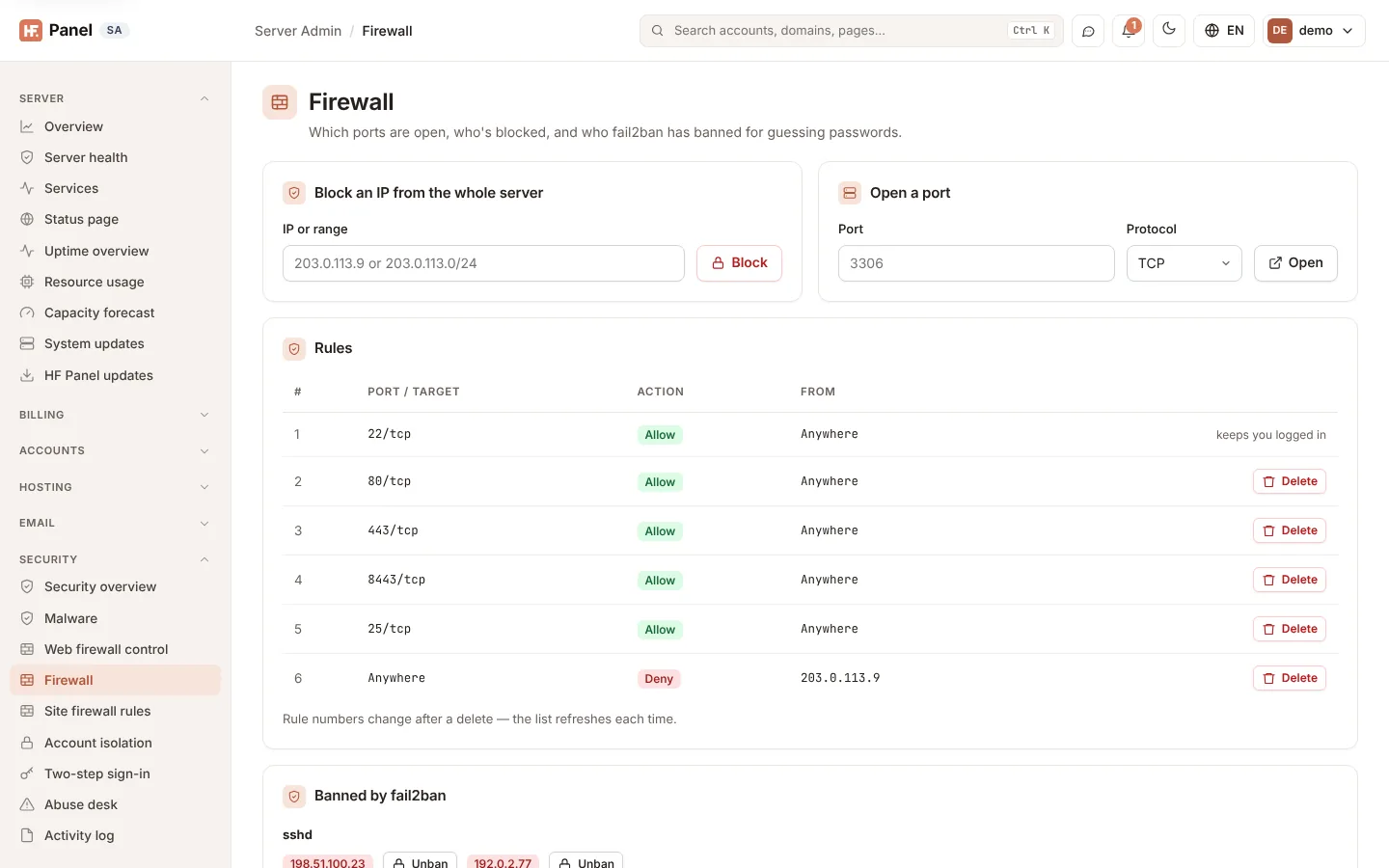
- Open Server Admin › Security › Firewall. The rules are listed as on Ubuntu, and adding or removing one changes firewalld's rules for you.
- Open Server Admin › System › PHP & Node.js to see the PHP versions you can add.
6. Version 8: switch on resource limits
Resource limits and the usage charts need cgroups v2. Version 8 starts with cgroups v1, and the installer leaves the boot settings alone, so it ends with a warning and Packages says the limits are not enforced. To switch, as root:
hf-agent cgroups-v2
reboot
The first command adds systemd.unified_cgroup_hierarchy=1 to every installed kernel's boot arguments; nothing
changes until the restart. Until then, Packages and Top accounts say the limits need a restart. After it, the
limits are enforced and hf-agent smoke-test shows cgroups v2 under System. To switch on limits for the
accounts, click Enforce limits under Server Admin › Accounts › Packages.
7. CloudLinux
CloudLinux installs like the AlmaLinux of the same version. Its own account limits (LVE) and per-account file system view (CageFS) stay in charge:
- HF Panel's resource limits stay off, so accounts are not limited twice. Packages and Top accounts say the limits are managed by CloudLinux LVE, and Enforce limits is refused. Set the limits with CloudLinux's tools.
- With CageFS on, Account isolation doesn't offer the private filesystem view or the jailed SSH shell.
hf-agent smoke-testshows LVE's default limits and CloudLinux's alt-php versions. HF Panel lists the alt-php versions but doesn't use them: websites get the PHP versions from Server Admin › System › PHP & Node.js.
8. What is not there yet
These are not available on Rocky Linux, AlmaLinux, CentOS Stream and CloudLinux yet; their screens say so:
| Feature | On these systems |
|---|---|
| MongoDB databases (and MongoDB in DB Studio) | not available |
| Docker apps | not available |
| Web application firewall | not available |
| Newer versions from other sources under Software versions | the system's own packages are offered |
MySQL/MariaDB and PostgreSQL databases, email, DNS, FTP, backups and everything else work as on Ubuntu and Debian.
Customers' websites see the same layout: Apache's files are under /etc/apache2 and PHP's under /etc/php/<version>,
and the files the installer replaced are kept as *.hostfog-orig.
Troubleshooting
| Problem | What to check |
|---|---|
| "HF Panel needs Ubuntu 22.04 …" at the start | the release is not one of the versions above (CentOS Stream 8 is not supported), or the CPU is not x86_64 |
| The installer stops at "Packages" on 8, naming PHP 8.3 | the extra PHP versions repository (rpms.remirepo.net) could not be reached or verified; check the server can reach it, then run the install command again |
| Limits not enforced on 8 | run hf-agent cgroups-v2 and restart the server (step 6) |
| A website or app can't connect to its database or to another port | ausearch -m avc -ts recent shows what SELinux refused. Update HF Panel under Server Admin › Server › Updates › HF Panel updates (or run the install command again): it sets the labels and switches again. Don't turn SELinux off |
| A custom panel or API port doesn't answer | update HF Panel again, so the port gets its SELinux label |
| Ports closed from outside | firewall-cmd --list-all and your provider's cloud firewall |
| Other PHP versions missing | the extra PHP repository could not be reached or verified; try again later |
See also Troubleshoot the installation.