New site
Make a new site in HF Local in one click: WordPress, Joomla, Laravel, Magento, Nextcloud, Moodle, React, Nuxt, Angular, a ZIP file or a Git repository.
New site makes a ready-to-use project in htdocs, installs what it needs and shows the installer's output live.
Where: HF Local › Sites › New site
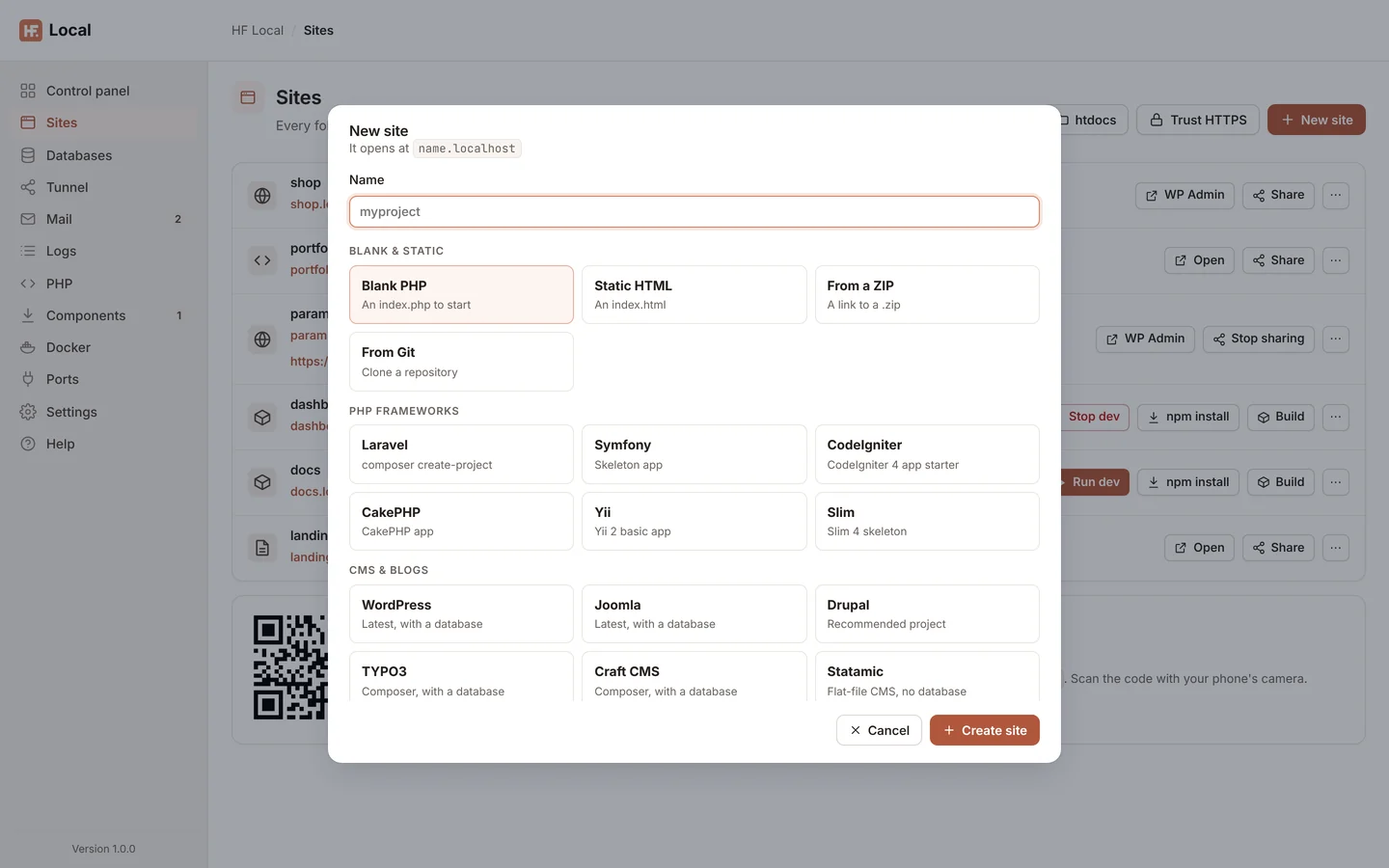
Make a site
- Click New site.
- Type a Name: letters, numbers,
-and_, starting with a letter or number (up to 41 characters). The dialog shows the address it will open at. - Choose what to make.
- For From a ZIP or From Git, type the link to the
.zipfile or the repository address. - Click Create site.
The output appears in a terminal window (Creating myproject…). Click Hide (keeps going) to close it while the work carries on; Show output on the Sites page brings it back. When it is done, click Open site (for sites that finish in the browser, such as WordPress, Joomla and Nextcloud, Open and finish setup).
What you can make
| Group | Choice | What you get |
|---|---|---|
| Blank & static | Blank PHP | an index.php to start |
| Static HTML | an index.html |
|
| From a ZIP | the contents of a .zip file from a link |
|
| From Git | a clone of a Git repository | |
| PHP frameworks | Laravel | a new Laravel project (composer create-project) |
| Symfony | the Symfony skeleton app | |
| CodeIgniter | the CodeIgniter 4 app starter | |
| CakePHP | a CakePHP app | |
| Yii | the Yii 2 basic app | |
| Slim | the Slim 4 skeleton | |
| CMS & blogs | WordPress | the latest WordPress, with a database |
| Joomla | the latest Joomla, with a database | |
| Drupal | the recommended Drupal project | |
| TYPO3 | TYPO3 with Composer, with a database | |
| Craft CMS | Craft with Composer, with a database | |
| Statamic | a flat-file CMS, no database | |
| October CMS | October with Composer, with a database | |
| Concrete CMS | Concrete with Composer, with a database | |
| Grav | a flat-file CMS, no database | |
| ProcessWire | the latest ProcessWire, with a database | |
| Backdrop CMS | the latest Backdrop, with a database | |
| Shops | PrestaShop | the latest PrestaShop, with a database |
| OpenCart | the latest OpenCart, with a database | |
| Magento | Magento, downloaded but not installed: it needs OpenSearch to finish | |
| Wikis & forums | MediaWiki | the latest MediaWiki, with a database |
| DokuWiki | a simple wiki, no database | |
| phpBB | a forum, with a database | |
| Files & analytics | Nextcloud | file sync and share |
| Matomo | web analytics | |
| Education | Moodle | courses, with a database |
| JavaScript | React | Vite + React |
| Next.js | a Next.js app | |
| Vue | Vite + Vue | |
| Svelte | Vite + Svelte | |
| SvelteKit | a SvelteKit app (sv create) |
|
| Astro | Astro basics | |
| Preact | Vite + Preact | |
| Vite | plain JavaScript with Vite | |
| Nuxt | a Nuxt app | |
| Remix | a Remix app | |
| Angular | an Angular app (ng new) |
|
| Express | an Express app (express-generator) |
|
| NestJS | a NestJS app (nest new) |
|
| Ghost | a Ghost blog on SQLite, installed locally |
A choice that needs a component you haven't installed shows Needs PHP, Needs Node.js or Needs MariaDB. Install it on Components first.
Note: a site that needs a database (WordPress, Joomla, MediaWiki and others) gets its own, shown on the Databases page with the site's name.
Note: Magento stops after the download, with a note in the output. Its setup needs OpenSearch (or Elasticsearch) on
127.0.0.1:9200, which HF Local doesn't install. You can run OpenSearch from the Docker page, then run thesetup:installcommand the note shows. Magento also needs a PHPmemory_limitof 2G and a few extensions on the PHP page.
From a terminal, hostfog new wordpress blog does the same. See Command line.